Showing posts with label news. Show all posts

Wednesday, August 29, 2012

Mozilla Firefox 15 Officially Released

Mozilla had officially released Firefox 15.0 this morning with many new features.

Key features of the Firefox 15 web-browser include reduced memory usage, a new JavaScript debugger, support for compressed textures, an improved JavaScript engine, WebGL enhancements, high precision timing support, and various other fixes and enhancements.

Firefox 15 for Android was released today as well to go along with the multi-platform desktop release. Additional Firefox 15 details are available from the Mozilla blog. Mozilla Firefox 15 is available for download from Mozilla.org.

Embedded below is the BananaBread first person shooter 3D demo that shows off some of the WebGL/graphics improvements found in this latest Firefox browser release.
Via Phoronix

Sunday, July 15, 2012

Microsoft Office 2013 Consumer Preview Ready To Download


Microsoft just released a consumer preview so you can check out what's new with Word, Excel, Powerpoint, and more. The new version is optimized for Windows 8 and offers plenty of cloud-enabled features for easy document sharing. If you want to check it out, just head over to Microsoft, sign up, and download.
Try Office 2013 now to discover  the new future. 


Friday, June 15, 2012

Skype 4.0 For Linux Official Release


skype linux

Skype 4.0 has been officially released for Linux today after being under "development" for far too long. This first major update in years for the Skype Linux client is coming one year after Microsoft acquired Skype.

Skype 4.0 for Linux is codenamed "Four Rooms for Improvement" and aims to address some of the missing features from the Linux client that the Windows and Mac OS X versions have had for a while. Plus there's some user-interface refinements and other improvements too.

Thursday, June 14, 2012

Opera 12 Release With Theme Customizable, Integrated Mail Client


A new version of the niche web browser Opera has been released with a number of new features.
Now you can set a theme for Opera,  add a new background image on the speed dial and new tab page and would also change the colors the tab bar and the browser chrome. The new themeing system is, arguably, the headline feature of this release. Unlike Firefox or Google Chrome, themes are applied to the entire Opera window – window border and all. The online theme catalog already boasts some 350 themes.

Tuesday, June 12, 2012

WordPress 3.4 “Green” is Out

wordpress 3.4

WordPress 3.4 is here and out the door. We’ve dubbed this release “Green” in honor of guitarist Grant Green whose soulful simplicity has kept many of us company during this release.
This release includes significant improvements to theme customization, custom headers, Twitter embeds, and image captions — here’s a short clip with the highlights

View more here.

Google Chrome Metro Dev Release

Chrome Metro


Last week, Google said that they would be launching a Metro version of Chrome with the next dev channel update. As promised, the dev channel update went live and we can now try out the new version of Chome for Metro.
Chrome is the first non-Microsoft web browser for Windows 8, coming with support for the Metro user interface introduced by the Redmond-based company.
The current version, Chrome 21.0.1171.0 uses just a small part of the Metro interface. For example, instead of the App bar menu present in the bottom of the screen that is supposed to show up each time you press the Windows + Z shortcut, you will be welcomed by the regular Windows 7 menu.
 Right clicking anywhere in the page will open a contextual menu for you – useful for any time of mouse + keyboard configuration, but still outside Microsoft’s recommendations for the Metro interface.
The final version of Google Chrome for Windows 8 will most likely be available for download in Windows Store, as soon as it will be verified and approved by Microsoft, after the internal Metro compatibility tests are performed.
You can download and install Chrome Metro here.

Sunday, June 10, 2012

Adobe updated Flash Player to 11.3, Adobe Air to 3.3


flash

Adobe has just updated Flash Player for Desktop and Android. The Flash Player version 11.3 has supported input from keyboard on fullscreen mode, and supported low-latency audio when listening to music online and programmed audio applications. This update also incorporated sandbox  for Firefox on Windows. For Mac users, Flash Player 11.3 also integrated a registered Apple Developer ID is available , you can use the Gatekeeper features on the OS X version of Mountain Lion .

For the mobile version , this update support stylus on Android 4.0. In addition , Adobe has released Adobe AIR 3.3 update to help Flash developers to create mobile applications and extensions for IOS 5.1.

Download:
Flash Player for Windows & Mac 
Flash Player for Android 
Adobe Air for Desktop 
Adobe Air for Mobile

Friday, June 8, 2012

Facebook introduces Facebook App Center


Today, facebook is announcing the App Center, a new place for people to find social apps. The App Center gives developers an additional way to grow their apps and creates opportunities for more types of apps to be successful.
In the coming weeks, people will be able to access the App Center on the web and in the iOS and Android Facebook apps. All canvas, mobile and web apps that follow the guidelines can be listed. All developers should start preparing today to make sure their app is included for the launch.

KDE released version 4.8.4


kde4.8

The KDE® Community released version 4.8.4 of updates for its Workspaces, Applications, and Development Platform. These updates are the third in a series of monthly stabilization updates to the 4.8 series. 4.8.4 updates bring many bugfixes and translation updates on top of the latest edition in the 4.8 series and are recommended updates for everyone running 4.8.2 or earlier versions. As the release only contains bugfixes and translation updates, it will be a safe and pleasant update for everyone. KDE’s software is already translated into more than 55 languages, with more to come. Significant bugfixes include improvements to the Kontact Suite, bugfixes in Dolphin and many more corrections and performance improvements all over the place.
View more here.

Thursday, June 7, 2012

openSUSE 12.2. Beta 1 Available

From Linux.com Feed:
It's Christmas time for a GNU/Linux user. After the impressive release of Fedora 17, openSUSE is gearing up for version 12.2. The team has announced the first beta of openSUSE 12.2.

Wednesday, June 6, 2012

Windows Embedded Standard 8 CTP2 ready to download

windows embedded

Microsoft's second preview of Windows Embedded Standard 8 is available now. The latest version, typically used outside the standard office and home environs, throws in Kinect for Windowscompatibility, as well as some gesture filters for arm-flailing interaction and NFC support. The preview now supports nine languages and requires at least a 1GHz processor, 1GB of system memory (2GB if you're running a 64 bit system), a DVD drive and 7GB of space for the full install. Hit up the source for plenty more detail and the download itself.

What's New in Windows Embedded Standard 8
·         Rich Experiences
Re-invent the way your customers interact with your device with Metro, Multi-Touch, Internet Explorer 10 and more.
·         Connected and Mobile
Deliver a solution that stays up and running, and allows you to connect to the things that matter most inside and outside the four walls.
·         Business Ready
Create a device that can be secured, managed and connect to IT systems to extend intelligence through the business process.
·         Consistent
Build a targeted OS image with powerful OS development tools and use the Unified Write Filter to ensure a consistent configuration to meet the line of business needs of your customers.
More info and download here.

Monday, June 4, 2012

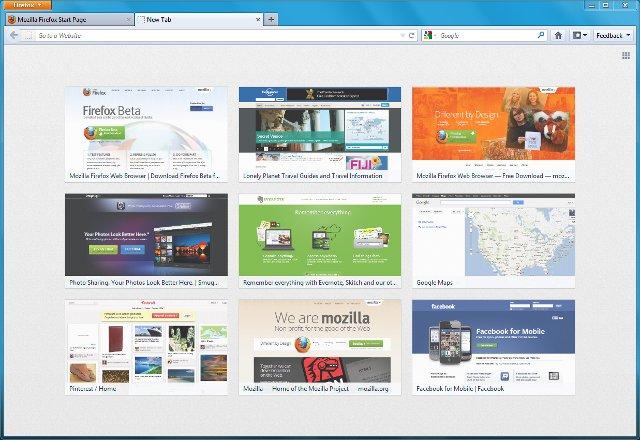
Firefox 13 Arrives With New Home Page And New Tab Page, SPDY Support


Most Firefox updates over the last few months were relatively minor. Firefox 13, which is now available for download and which will go out to existing users tomorrow, i a bit different. This update actually introduces a number of consumer-facing updates that finally bring some of Firefox’s features up to par with Google’s Chrome. Most importantly, this new version finally features the long-promised new home and new tab screens. In addition, Firefox now supports the Google-backed SPDY protocol, which promises to significantly improve load times for those sites that support it.

firefox13

Friday, June 1, 2012

Windows Server 2012 Release Candidate now ready to download

winserver2012

After Window 8 RP, Microsoft releases Windows Server 2012 Release Candidate to day, the next of Window Server 2008  will offer businesses and hosting providers a scalable, dynamic, and multitenant-aware, cloud-optimized infrastructure. It securely connects across premises and helps IT Professionals to respond to business needs faster and more efficiently.
Windows Server 2012 Release Candidate (RC):
·         Takes you beyond virtualization
·         Delivers the power of many servers with the simplicity of one
·         Opens the door to every app on any cloud
·         Enables the modern work style

Need more information? See the product details page.
Download from Microsoft Site

Thursday, May 31, 2012

Windows 8 Release Preview Ready For Download


win8


After Customer Preview, today Microsoft releases the last preview of Window 8. You can download from this link:


System Requirements:
Windows 8 Release Preview works great on the same hardware that powers Windows 7:
Processor: 1 gigahertz (GHz) or faster
RAM: 1 gigabyte (GB) (32-bit) or 2 GB (64-bit)
Hard disk space: 16 GB (32-bit) or 20 GB (64-bit)
Graphics card: Microsoft DirectX 9 graphics device with WDDM driver

Additional requirements to use certain features:
To use touch, you need a tablet or a monitor that supports multitouch.
To access the Windows Store and to download and run apps, you need an active Internet connection and a screen resolution of at least 1024 x 768.
To snap apps, you need a screen resolution of at least 1366 x 768.
Internet access (ISP fees might apply)
"Important: If you decide to go back to your previous operating system, you'll need to reinstall it from the recovery or installation media that came with your PC, which is typically DVD media. If you don’t have recovery media, you might be able to create it from a recovery partition on your PC using software provided by your PC manufacturer. Check the support section of your PC manufacturer’s website for more information. After you install Windows 8, you won’t be able to use the recovery partition on your PC to go back to your previous version of Windows. "
More info at Microsoft site.

Sunday, May 27, 2012

Cubby Beta, the best files syn service [Free Invite]


If you're using DropBox, Google Drive, Sky Drive or BoxNet maybe you like Cubby too. is a file-syncing service just like Dropbox, Google Drive, SkyDrive, and other cloud storage services out there, but it has two major differences that set it apart:
You can sync any folder—not just your main "cubby" folder—to the cloud and your other machines. Just right-click any folder and tell it to sync with Cubby. No symlinks, checkbox menus, or other tweaks necessary.
You get 5GB of storage in the cloud (that is, accessible from your browser), but you can sync an unlimited amount of data between your computers. That means if you want to sync your giant iTunes library, for example, you can do so without paying a cent.
Cubby is still beta, if you can't wait for try Cubby, comment your email here to get an invite.