Showing posts with label release. Show all posts

Tuesday, October 9, 2012

Mozilla Firefox 16 Officially Released, Improves HTML5, Developer Tools


Firefox 16 was released today as the latest open-source web-browser update out of Mozilla.

Key features of Firefox 16 include a new developer command line to provide easy keyboard controls over the developer tools in an intuitive manner, unprefixing new stable features, and improvements to Firefox for Android.

Now deemed stable and unprefixed with Firefox 16 are CSS3 Animations, Transitions, Transforms, Image Values, IndexedDB and Values and Units. As additionally bonuses, the Battery API and Vibration APIs that were developed in part by Mozilla are also now considered stable.

For those curious about the Firefox Developer Command-Line see the video below or this Mozilla blog post. 

Via  Phronix

Wednesday, August 29, 2012

Mozilla Firefox 15 Officially Released

Mozilla had officially released Firefox 15.0 this morning with many new features.

Key features of the Firefox 15 web-browser include reduced memory usage, a new JavaScript debugger, support for compressed textures, an improved JavaScript engine, WebGL enhancements, high precision timing support, and various other fixes and enhancements.

Firefox 15 for Android was released today as well to go along with the multi-platform desktop release. Additional Firefox 15 details are available from the Mozilla blog. Mozilla Firefox 15 is available for download from Mozilla.org.

Embedded below is the BananaBread first person shooter 3D demo that shows off some of the WebGL/graphics improvements found in this latest Firefox browser release.
Via Phoronix

Wednesday, August 1, 2012

KDE 4.9 released


KDE has announced a new stable release of KDE Plasma Desktop, KDE Applications and the KDE Platform. This release is dedicated to Claire Lotion, a notable and dedicated KDE contributor. The release comes with several security patches and bug fixes with greater stability and responsiveness overall. Some of the key changes are:
Improvements in Dolphin File Manager, Konsole, Activities and KWin Window manager.
Enhanced apps like Okular, Kopete, KDE PIM and more.
Stability improvements.
Improvements in networking and general responsiveness of KDE.

Binary packages are yet to appear in distro repos. You can read the release announcement here.

Tuesday, July 17, 2012

Firefox 14 Released, Update Now

firefox update

Firefox 14 has been released. Updating to new version. Can't wait for something new in this version of Firefox.
Update your firefox now.

Thursday, June 28, 2012

Google Chrome Stable 20.0.1132.47 Released

The Beta and Stable channel has been updated to 20.0.1132.47 for Windows, Mac, Linux, and Chrome Frame. This release disables some of Chrome’s GPU acceleration features on Mac hardware containing the Intel HD 4000 graphics chip (e.g. the new Macbook Airs), in order to prevent a resource leak which is causing a kernel panic on that hardware. This is a temporary change while we work on fixing the root cause of the issue.

What’s New in Chrome 20?
Apart from over 20 security fixes (paying out total rewards of $11,500 to the finders) there is little new to see in this version – those expecting a milestone release such as Chrome 20 to include lots of cool new features will be sadly disappointed…
The official changelog lists the security fixes in more detail but doesn’t specify any other changes – although there are some minor ones. I’ve noted before how Google often ‘hide’ new features and this trend has worsened in recent releases e.g. the unpublicized new Startup tab of Chrome 19 which proved so unpopular.

The remaining changes include:
    - Various fixes and stability improvements
    - The ‘New Tab’ button is bigger – a little wider than before

Download:
Install from internet
Offline installer

Friday, June 15, 2012

Skype 4.0 For Linux Official Release


skype linux

Skype 4.0 has been officially released for Linux today after being under "development" for far too long. This first major update in years for the Skype Linux client is coming one year after Microsoft acquired Skype.

Skype 4.0 for Linux is codenamed "Four Rooms for Improvement" and aims to address some of the missing features from the Linux client that the Windows and Mac OS X versions have had for a while. Plus there's some user-interface refinements and other improvements too.

Thursday, June 14, 2012

Opera 12 Release With Theme Customizable, Integrated Mail Client


A new version of the niche web browser Opera has been released with a number of new features.
Now you can set a theme for Opera,  add a new background image on the speed dial and new tab page and would also change the colors the tab bar and the browser chrome. The new themeing system is, arguably, the headline feature of this release. Unlike Firefox or Google Chrome, themes are applied to the entire Opera window – window border and all. The online theme catalog already boasts some 350 themes.

Tuesday, June 12, 2012

WordPress 3.4 “Green” is Out

wordpress 3.4

WordPress 3.4 is here and out the door. We’ve dubbed this release “Green” in honor of guitarist Grant Green whose soulful simplicity has kept many of us company during this release.
This release includes significant improvements to theme customization, custom headers, Twitter embeds, and image captions — here’s a short clip with the highlights

View more here.

Google Chrome Metro Dev Release

Chrome Metro


Last week, Google said that they would be launching a Metro version of Chrome with the next dev channel update. As promised, the dev channel update went live and we can now try out the new version of Chome for Metro.
Chrome is the first non-Microsoft web browser for Windows 8, coming with support for the Metro user interface introduced by the Redmond-based company.
The current version, Chrome 21.0.1171.0 uses just a small part of the Metro interface. For example, instead of the App bar menu present in the bottom of the screen that is supposed to show up each time you press the Windows + Z shortcut, you will be welcomed by the regular Windows 7 menu.
 Right clicking anywhere in the page will open a contextual menu for you – useful for any time of mouse + keyboard configuration, but still outside Microsoft’s recommendations for the Metro interface.
The final version of Google Chrome for Windows 8 will most likely be available for download in Windows Store, as soon as it will be verified and approved by Microsoft, after the internal Metro compatibility tests are performed.
You can download and install Chrome Metro here.

Thursday, June 7, 2012

openSUSE 12.2. Beta 1 Available

From Linux.com Feed:
It's Christmas time for a GNU/Linux user. After the impressive release of Fedora 17, openSUSE is gearing up for version 12.2. The team has announced the first beta of openSUSE 12.2.

Monday, June 4, 2012

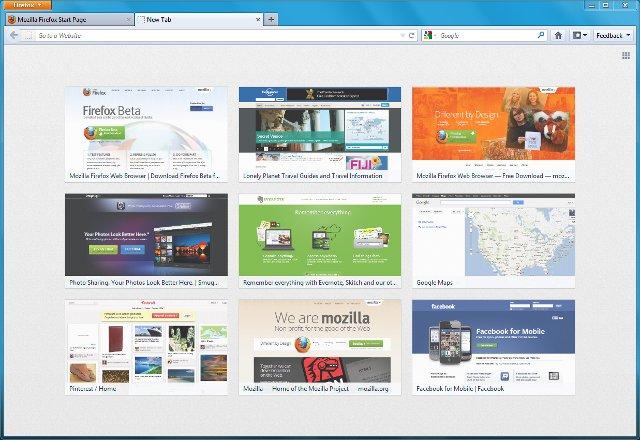
Firefox 13 Arrives With New Home Page And New Tab Page, SPDY Support


Most Firefox updates over the last few months were relatively minor. Firefox 13, which is now available for download and which will go out to existing users tomorrow, i a bit different. This update actually introduces a number of consumer-facing updates that finally bring some of Firefox’s features up to par with Google’s Chrome. Most importantly, this new version finally features the long-promised new home and new tab screens. In addition, Firefox now supports the Google-backed SPDY protocol, which promises to significantly improve load times for those sites that support it.

firefox13

Thursday, May 31, 2012

Windows 8 Release Preview Ready For Download


win8


After Customer Preview, today Microsoft releases the last preview of Window 8. You can download from this link:


System Requirements:
Windows 8 Release Preview works great on the same hardware that powers Windows 7:
Processor: 1 gigahertz (GHz) or faster
RAM: 1 gigabyte (GB) (32-bit) or 2 GB (64-bit)
Hard disk space: 16 GB (32-bit) or 20 GB (64-bit)
Graphics card: Microsoft DirectX 9 graphics device with WDDM driver

Additional requirements to use certain features:
To use touch, you need a tablet or a monitor that supports multitouch.
To access the Windows Store and to download and run apps, you need an active Internet connection and a screen resolution of at least 1024 x 768.
To snap apps, you need a screen resolution of at least 1366 x 768.
Internet access (ISP fees might apply)
"Important: If you decide to go back to your previous operating system, you'll need to reinstall it from the recovery or installation media that came with your PC, which is typically DVD media. If you don’t have recovery media, you might be able to create it from a recovery partition on your PC using software provided by your PC manufacturer. Check the support section of your PC manufacturer’s website for more information. After you install Windows 8, you won’t be able to use the recovery partition on your PC to go back to your previous version of Windows. "
More info at Microsoft site.